


I recently started a new job, and with a new job comes a new Mac to bootstrap (I mean, who uses Windows anymore?).
The last time around, I realized that I was almost 100% reliant on Homebrew. All the packages I needed were available there in some form. I was gradually switching my installations to brew and rarely hit a download button.
I've read that some people find it fun to completely bootstrap their new machines with a script or Ansible playbook. I wish I could say that I had the time to do that, but I don't. I often find myself needing more tools gradually.
My mindset is a little different going into this job. The one thing I previously kicked myself for was installing CLIs from their respective websites and trying to cudgel them into working (awscli, Oracle CLI, etc.). I seem to have a thing for not reading the directions and just YOLOing the various CLI configs and installs. This time, I'm doing it methodically and correctly.
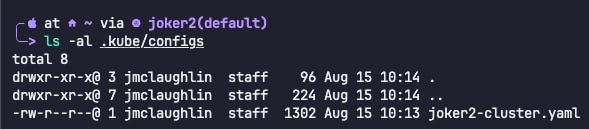
Most recently, I had to rethink how I interact with Kubernetes clusters. Previously, I would just swap out the config file for a new one when I needed to hit a cluster. Now, I'm dropping all my kube configs in a directory and using kubectx to switch environments. It's a nice quality-of-life improvement that I should have done in the past.
Now, instead of renaming and dropping a new kube config into the .kube folder, I drop new kubeconfigs here:
And I mention this in my .zshrc file:

So yeah, kind of cool. I'm not really sure if it's optimal, but at least now I have a "flow" for managing more than one kube config (I feel like everyone and their mom has known about this and I just decided to start using it now).
Another small change from what I have done in the past is I'm now asking the question: if it's not on Homebrew, do I really need it? This may seem a little "pie in the sky" Homebrew elitist type beat, but hey, Homebrew is the best and I frequently reinstall programs and want to make sure "all the files" are removed. This is hard to do when you install via the big download button. It's very simple with Homebrew: brew uninstall <package> --zap. That --zap goes through and zaps all the files from your machine related to the package. It's awesome.
I'm also running a specific one-liner every day:
brew update && brew upgrade --greedy && brew upgrade --cask --greedy && brew cleanup --prune=all && brew autoremove && brew doctorbrew update- syncs package definitions from upstreambrew upgrade --greedy- upgrades all formulae (including auto-updaters like Chrome)brew upgrade --cask --greedy- upgrades all casks with same greedy behaviorbrew cleanup --prune=all- purges old versions and cached downloadsbrew autoremove- removes orphaned dependenciesbrew doctor- runs system health diagnostics
Overkill for sure, but I like it.
The TL;DR is: New mac. New me.
Cheers,
Joe